Guides
Hosted MCP server
Connect Claude and ChatGPT by signing in to Postiv, choosing a workspace, and approving access. API keys remain available for other clients.
New to the integration? Explore the Postiv LinkedIn MCP server for a workflow demo, client setup instructions, and examples of research, drafting, scheduling, and analytics.
Connect your AI app to Postiv with OAuth: sign in with your own Postiv account, select the workspace it can use, and approve permissions. No organization API key is needed for Claude or ChatGPT. Posts and carousels created through OAuth are attributed to the signed-in Postiv user within the approved workspace.
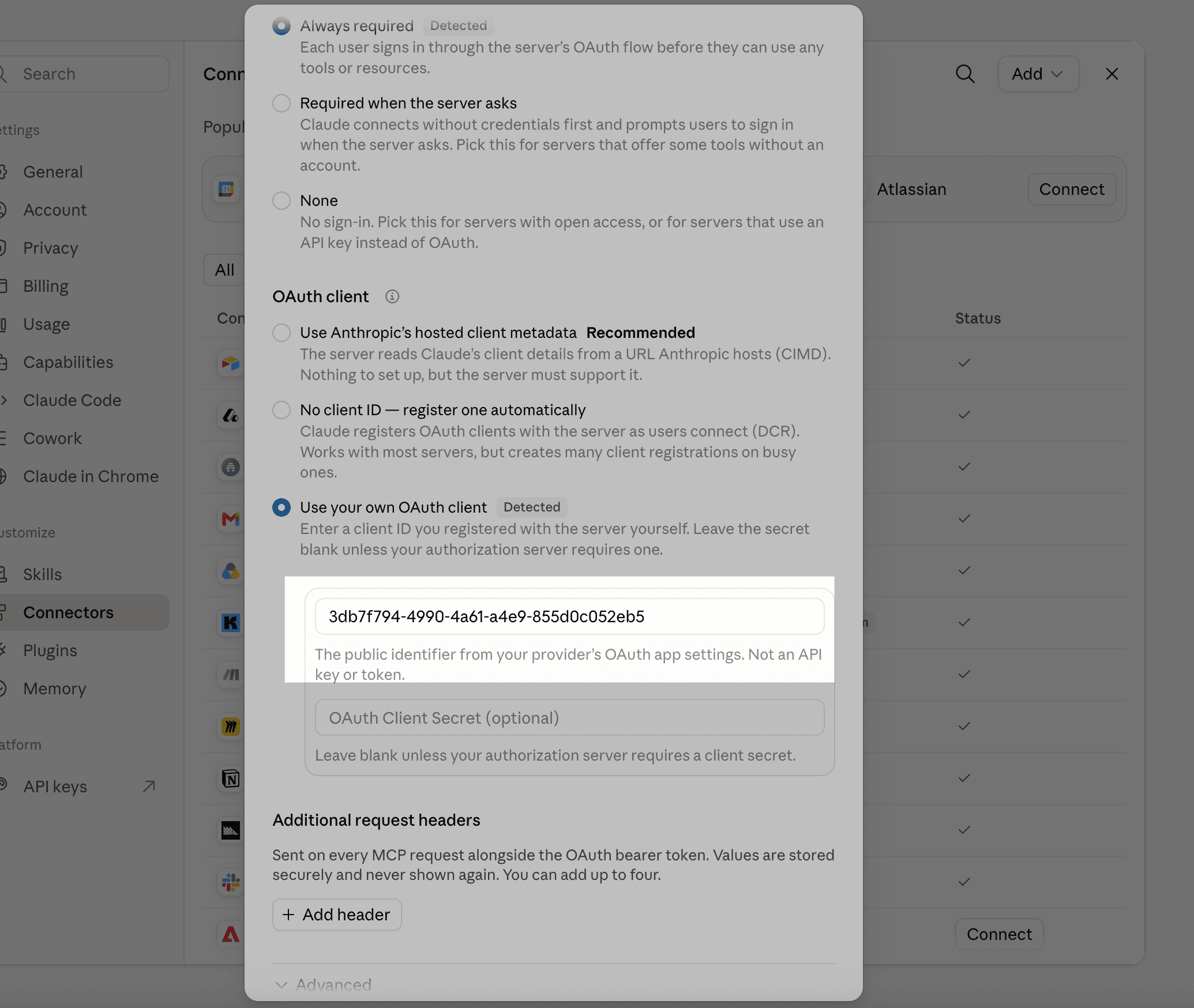
https://postiv.ai/mcp3db7f794-4990-4a61-a4e9-855d0c052eb5Use the public client ID above when your app asks for OAuth client details. Leave the client secret empty. Choose a predefined or user-defined client if offered; automatic client registration is not required for this setup.
For a guided setup with copy buttons, open Connect Postiv. Custom connector availability depends on your AI app plan and workspace policy.
Connect Postiv to Claude
Add a custom connector, then sign in with your Postiv account.
- 1Open Claude connectors, choose Add custom connector, and name it Postiv.
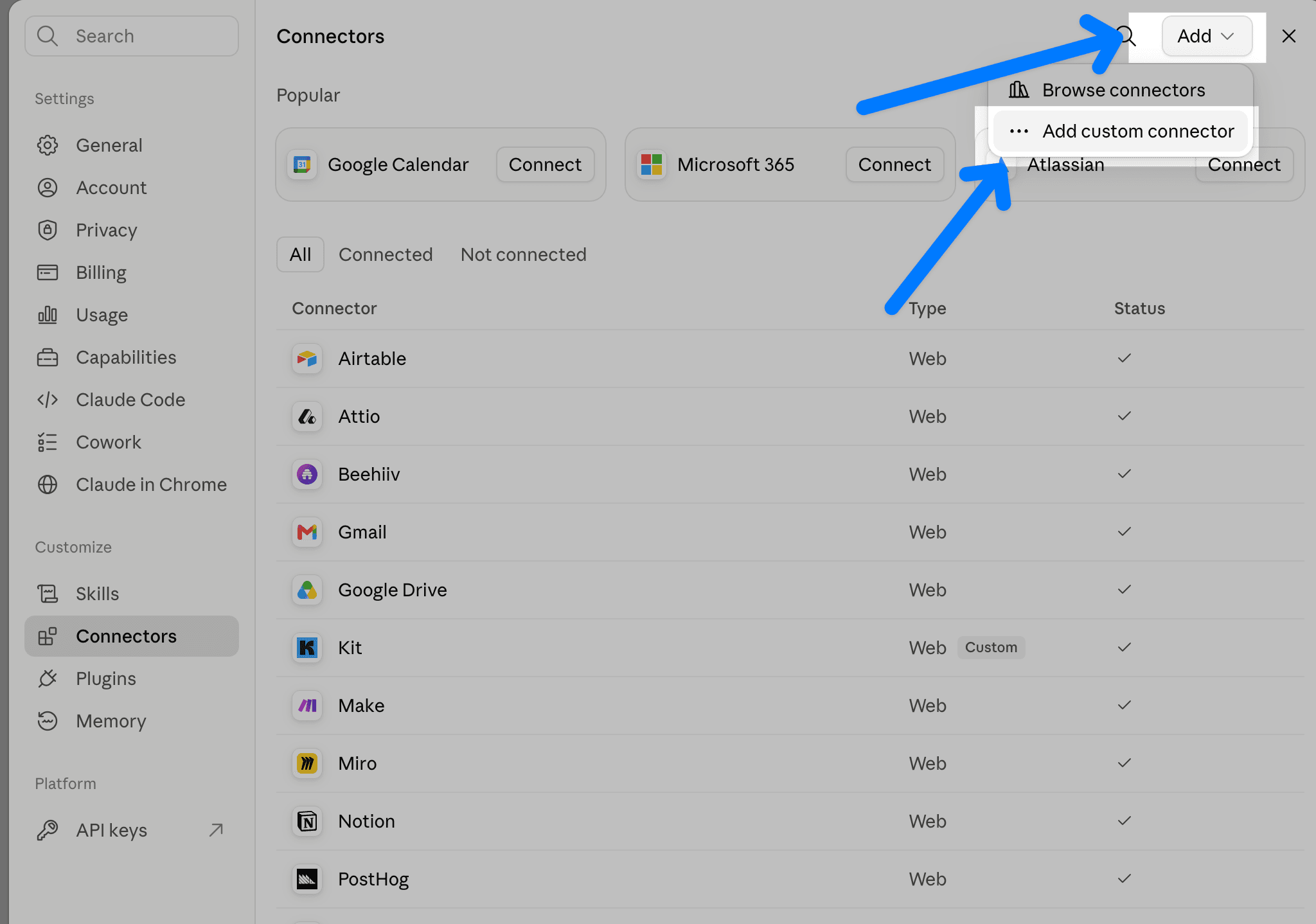
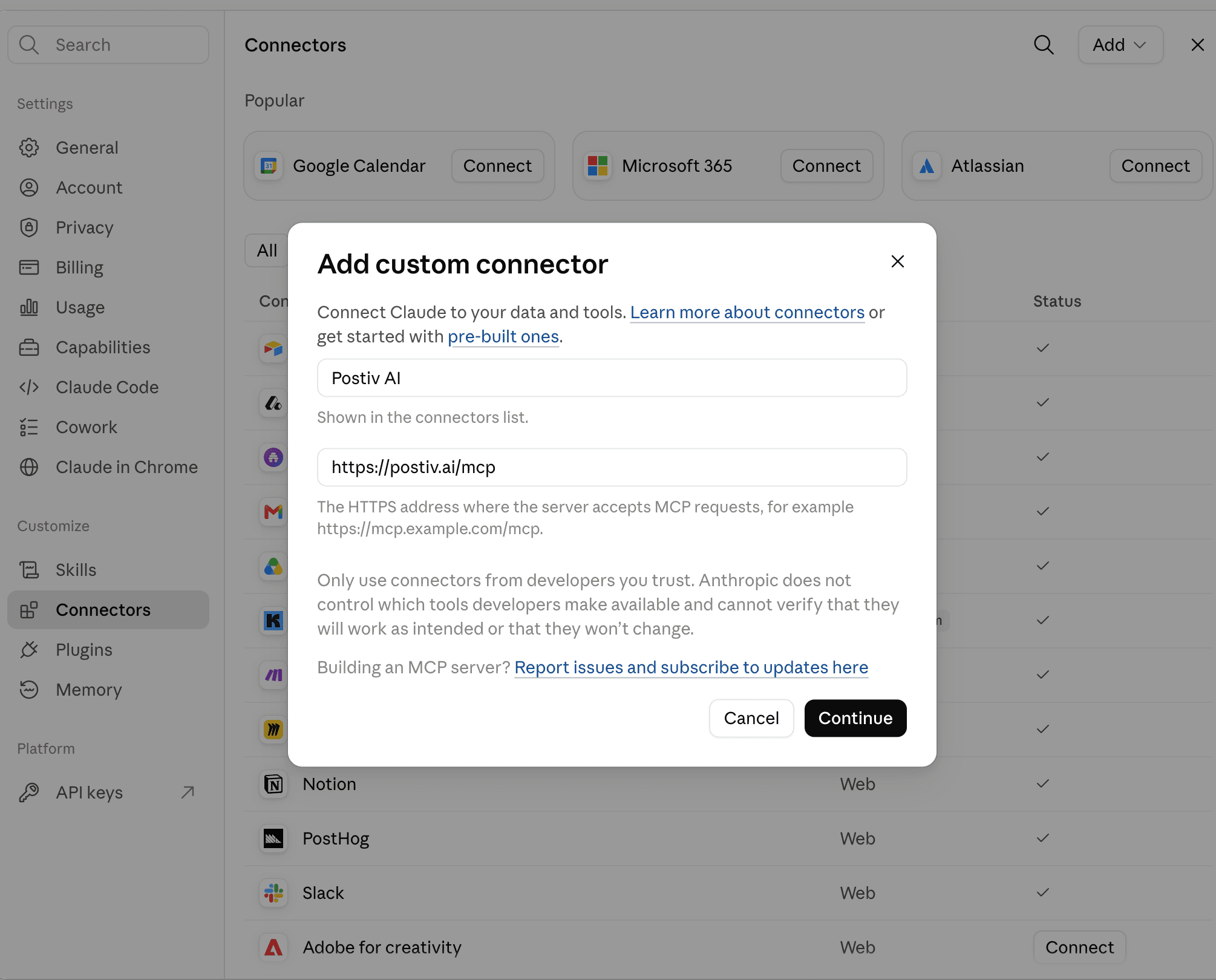
- 2Paste the MCP server URL from this guide and choose Continue. Wait for Claude to check the server.
- 3On the authentication step, select Always required and Use your own OAuth client. Enter the OAuth client ID from this guide and leave the client secret empty. Then choose Add.
- 4Choose Connect on the Postiv connector. Sign in to Postiv, select your workspace, review the permissions, and choose Connect workspace.
- 5Enable Postiv in a new conversation and ask it to confirm your workspace and list your LinkedIn profiles.
Connect Postiv to your ChatGPT account
Create a custom MCP app for your own account. Availability depends on your plan and workspace settings.
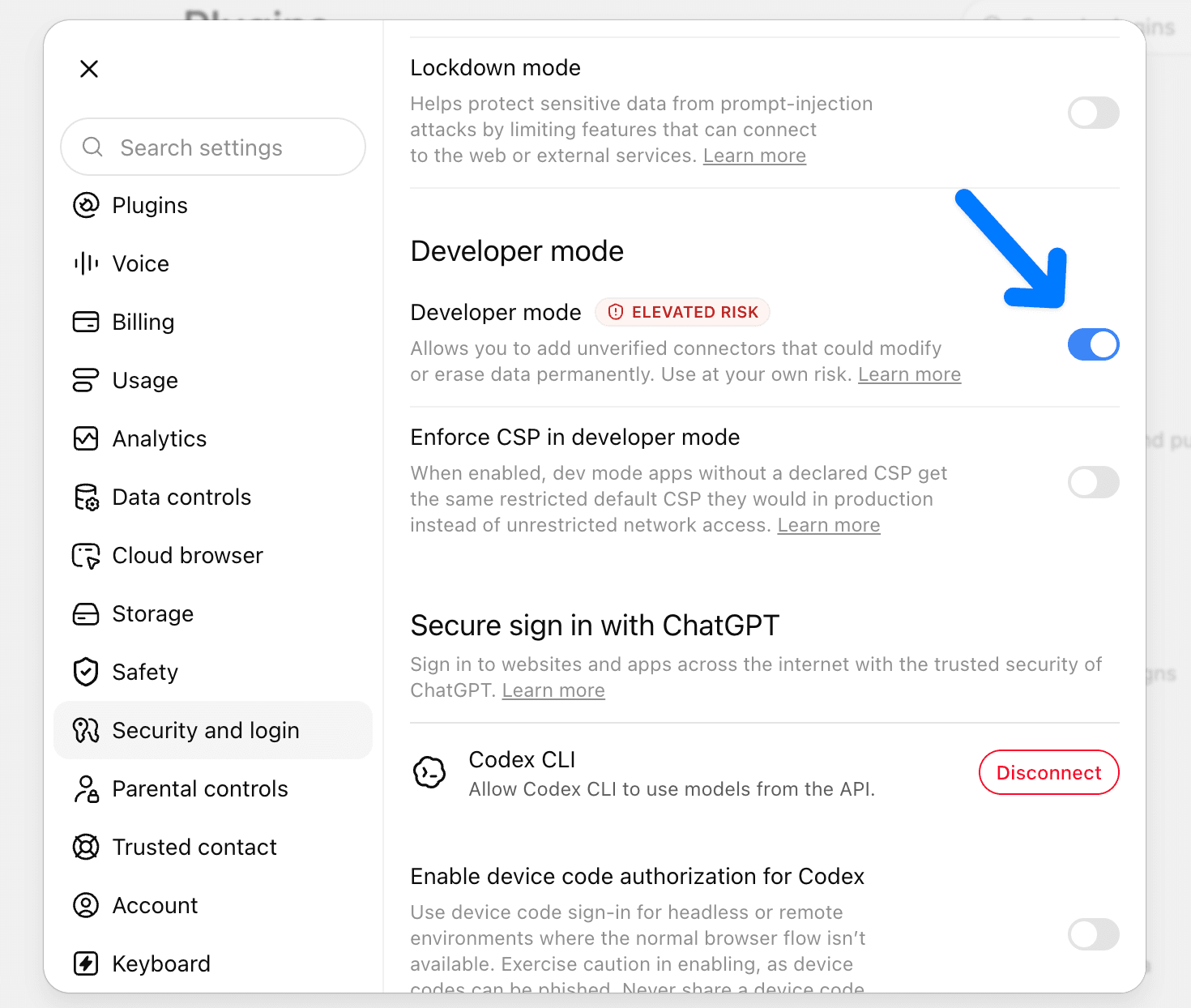
- 1On chatgpt.com, open Settings → Security and login and enable Developer mode. Some accounts show it under Apps → Advanced settings.
- 2Open the connector form, name the app Postiv, paste the MCP server URL from this guide, and choose OAuth. If the form does not open, go to Plugins and choose Create app.
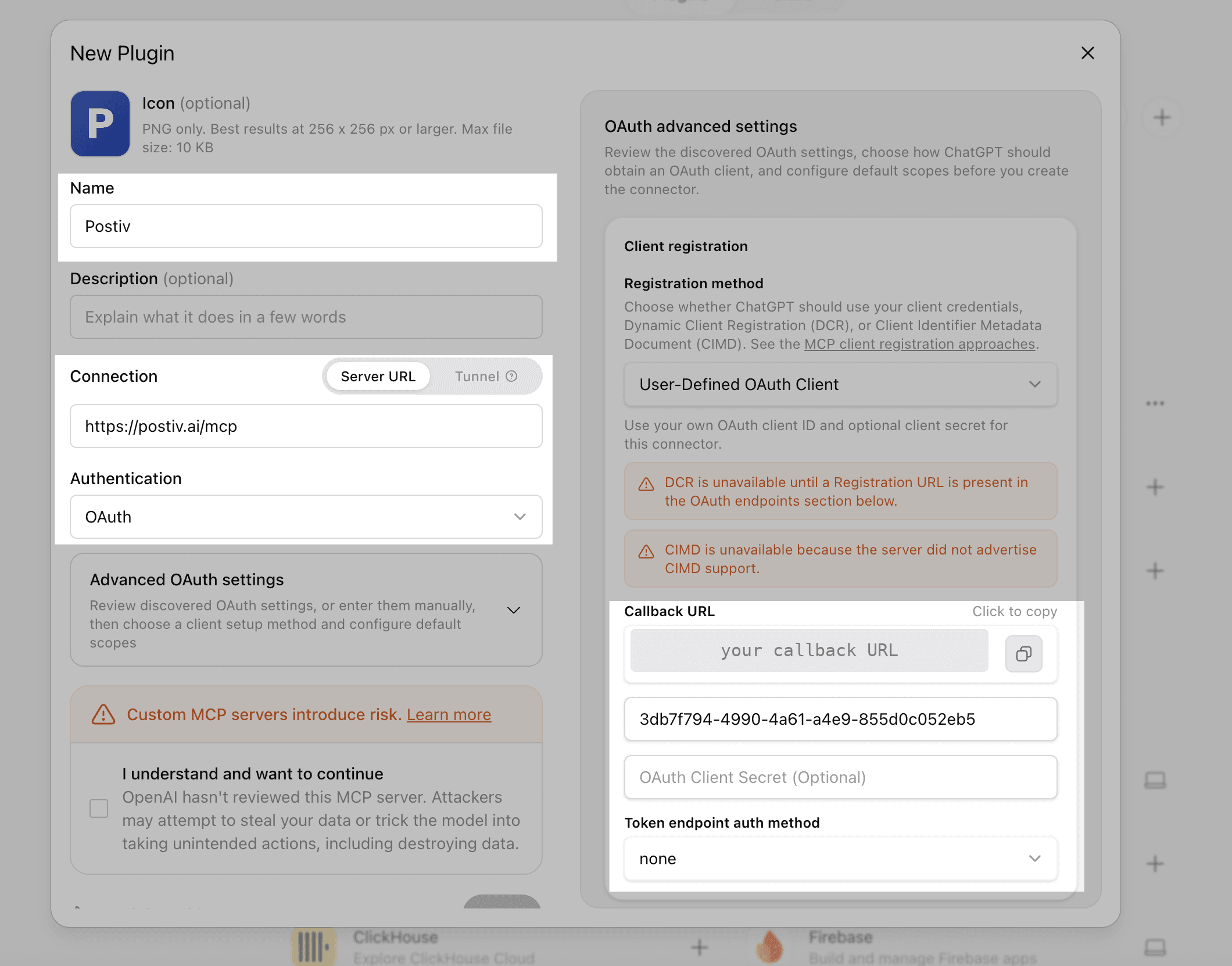
- 3In advanced OAuth settings, choose User-Defined OAuth Client. Enter the client ID from this guide, leave the secret empty, and set token endpoint authentication to none.
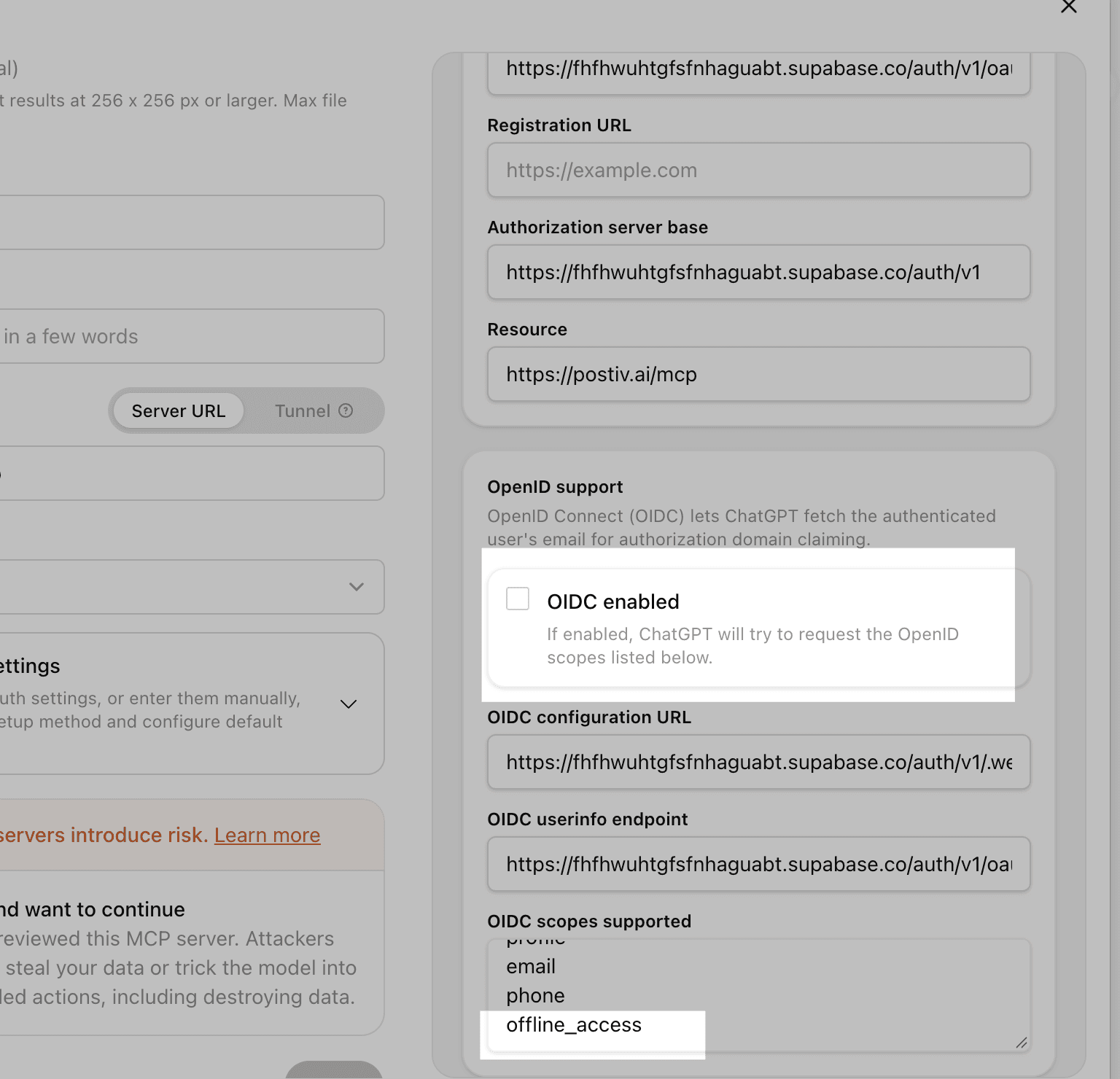
- 4Turn OpenID/OIDC off. Keep email selected under Default scopes, and enter offline_access in Base scopes so ChatGPT can refresh access.
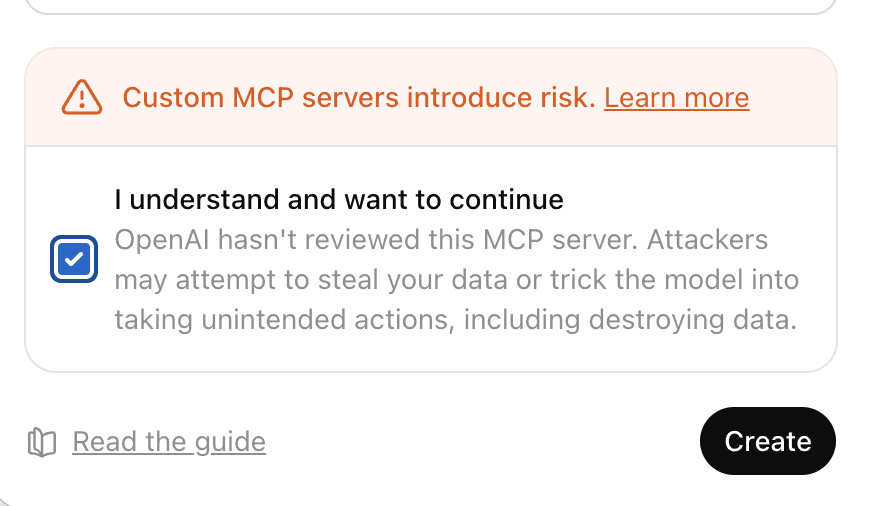
- 5Review the custom-server notice, create the app, and choose Sign in with Postiv. Select your workspace, review the permissions, and choose Connect workspace.
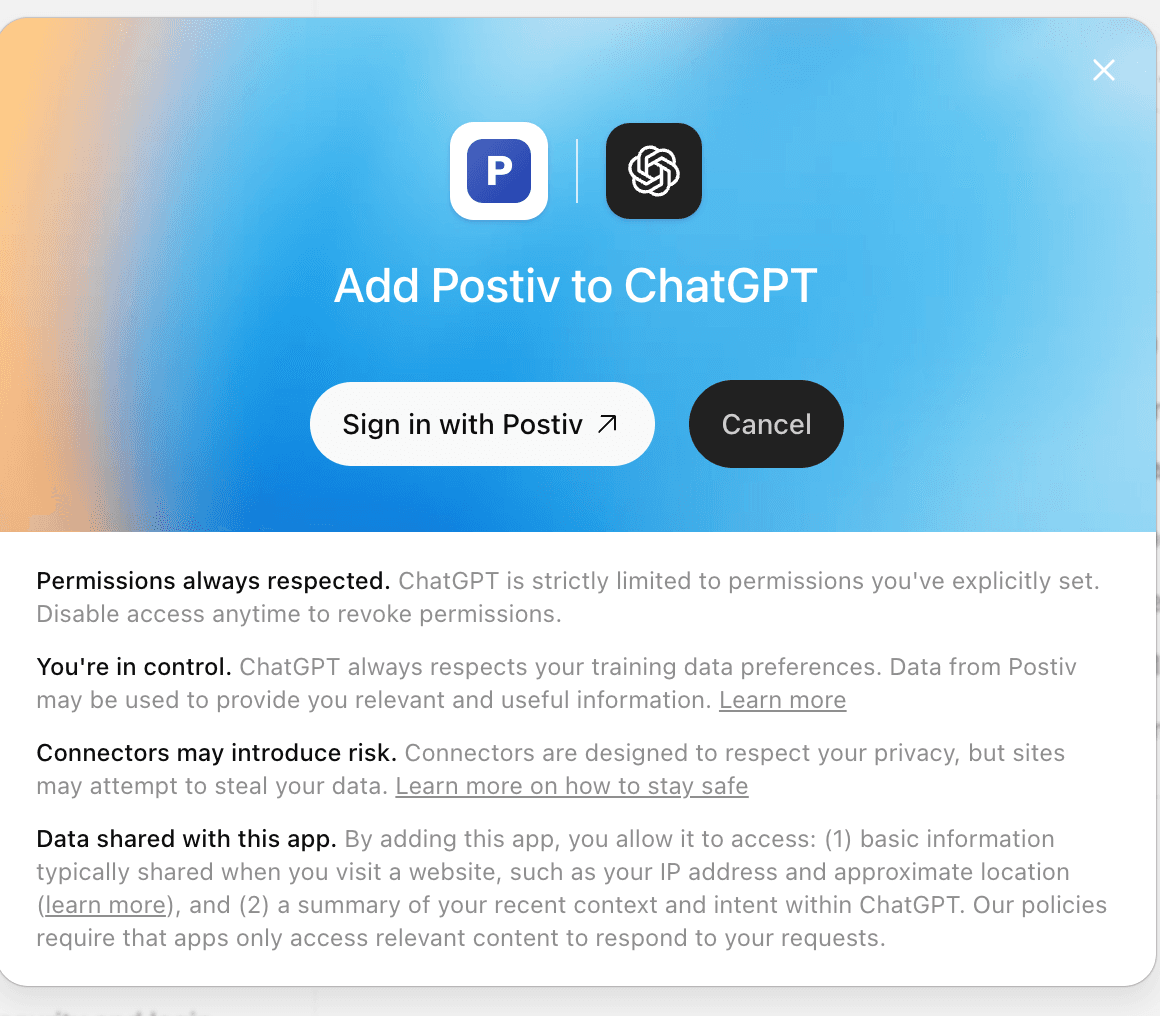
- 6Back in ChatGPT, refresh the app tools if needed. Choose Try in chat, or start a new chat and select Postiv from the tools menu. Ask it to confirm your workspace and list your LinkedIn profiles.
Current ChatGPT (web) requirements
Workspace and permissions
Read & write is selected by default for new connections and allows creating, editing, deleting, scheduling, and publishing content, plus approvals and engagement actions. Choose Read only if you only need research and reporting.
The workspace you approve stays fixed for that connection. Postiv checks your current workspace access on every request, including agency access. Existing LinkedIn profile approval rules still apply.
Token refresh and reconnecting
Your AI app uses refresh tokens to renew access automatically while the authorization remains valid. You do not need to copy or rotate access tokens yourself. If the app asks you to sign in again, reconnect from its connector settings. Losing workspace access or revoking the connection stops access.
Existing connections keep their original permissions. To change workspace or access, revoke the connection in Postiv and reconnect. Claude and ChatGPT currently share the Postiv MCP authorization, so revoking it can disconnect both.
Manage or revoke connected apps. Revoking an OAuth connection does not invalidate an organization API key.
Connection troubleshooting
| Problem | What to check |
|---|---|
| ChatGPT sign-in fails after consent | Turn OpenID/OIDC off in advanced OAuth settings; use client authentication none, leave the secret empty, and keep email selected, and enter offline_access in Base scopes. |
| Invalid redirect URI | Copy the exact callback URL shown by your AI app and contact Postiv support to register it. Do not change the MCP server URL or paste a callback from another account. |
| Connected, but no tools appear | Refresh the connector tools, then enable Postiv in a new conversation. In ChatGPT, Try in chat opens a conversation with the app selected. |
| Reads work, but writes fail | An existing read-only grant stays read-only. Revoke it in Postiv and reconnect with Read & write. |
| Wrong workspace | Revoke the existing Postiv authorization and reconnect, selecting the intended workspace. |
| A previous API-key connection is still in use | Remove that connector from your AI app and add the clean MCP server URL using OAuth. Other clients using the key keep working. |
Other clients and existing API keys
Claude Code, Cursor, Codex, and generic HTTP clients can still use an organization API key. An admin can generate one in Postiv integrations; see API-key setup. The examples below use key authentication. OAuth in another client requires its exact callback URL to be registered first.
Existing Authorization bearer headers, x-api-key headers, and secret URLs such as https://postiv.ai/mcp/pk_postiv_... remain supported. Treat keys and any URL containing one like passwords. The REST API continues to use organization API keys.
Claude Code
claude mcp add --transport http postiv https://postiv.ai/mcp \
  --header "Authorization: Bearer pk_postiv_..."
Cursor with an API key
Open Postiv setup in Cursor. This adds an environment-variable template, not a credential. Set POSTIV_API_KEY in the environment used to launch Cursor, restart Cursor, and enable the server. See Cursor install links and environment-variable configuration.
{
  "mcpServers": {
    "postiv": {
      "url": "https://postiv.ai/mcp",
      "headers": {
        "Authorization": "Bearer ${env:POSTIV_API_KEY}"
      }
    }
  }
}
Generic Streamable HTTP client
{
  "postiv": {
    "url": "https://postiv.ai/mcp",
    "headers": {
      "Authorization": "Bearer pk_postiv_..."
    }
  }
}
Claude Desktop with mcp-remote
{
  "mcpServers": {
    "postiv": {
      "command": "npx",
      "args": [
        "-y",
        "mcp-remote",
        "https://postiv.ai/mcp",
        "--header",
        "Authorization: Bearer pk_postiv_..."
      ]
    }
  }
}
Available tools
Tools use the approved workspace permissions. Hosts that support MCP Apps can display interactive post, image, carousel, and inspiration widgets.
| Tool | Scope | Description |
|---|---|---|
| resolve_linkedin_mention | profiles:read | Resolve a LinkedIn person, company, school or showcase URL using the posting integrationId. Returns a URN and ready-to-insert mention token for create_post/update_post captions or comment_on_post/reply_to_comment text. Optional displayName controls the label. Personal URL lookup requires Community Management access and an administered page; unresolved URLs fail explicitly. Comment/reply tokens are converted into LinkedIn mention attributes; plain @Name is not a tag. MCP only. |
| suggest_reply | engage:write | Generate a reply suggestion from a live post/comment and selected profile voice. Does not publish. MCP only. |
| list_engagement_posts | engage:read | Team (including your own profiles/pages) or external-feed discovery. Live post reads; team threads and unanswered counts refresh completely. status=unanswered; author/list/creator/text/engagement filters; days and before/nextCursor pagination. Failed posts appear in failedItems with partial=true; healthy posts remain available. Counts cover successful refreshes only (null if all fail). Feed discovery remains indexed, requires acting integrationId for reads. MCP only. |
| get_post_comments | engage:read | Live-refresh a complete thread by opaque postId. Returns commentId, parentCommentId, status and unansweredCount. Reading does not dismiss. No cached fallback. MCP only. |
| comment_on_post | engage:write | Immediately publish a top-level LinkedIn comment using postId, integrationId and text (1–1250 characters). MCP only. |
| reply_to_comment | engage:write | Live-check commentId on postId, automatically prefix a real tag of the comment author when their name and URN are available, publish a reply as integrationId, then refresh the thread. Pass the reply body without that prefix; existing leading author tags are not duplicated. The 1250-character limit includes the added name. Published-with-warning results must not be retried. MCP only. |
| react_to_post | engage:write | React to postId or optional commentId as integrationId; reactionType=null removes. MCP only. |
| dismiss_comment | engage:write | Mark a team comment no reply needed in Postiv; clears unanswered status without changing LinkedIn. MCP only. |
| delete_comment | engage:write | Delete the actual LinkedIn comment using commentId and integrationId. Requires this authenticated actor’s recorded comment; supports both sources and new replies. MCP only. |
| list_engage_feed_lists | engage:read | List current workspace external-feed tracking lists. |
| create_engage_feed_list | engage:write | Create a tracking list, maximum five per workspace. MCP only. |
| add_engage_feed_profile | engage:write | Track a personal LinkedIn profile, maximum thirty per list. Discovery can be pending. MCP only. |
| remove_engage_feed_profile | engage:write | Remove a profile from one tracking list. MCP only. |
| get_workspace | workspace:read | Read the connected workspace (name, slug) and which scopes this key has. Call first. |
| submit_feedback | feedback:write | Send explicit feedback about Postiv or Bob to the product team. |
| add_knowledge | knowledge:write | Add a text document to the workspace knowledge base for retrieval by Postiv's AI. |
| search_knowledge | knowledge:read | Semantically search the workspace knowledge base before drafting, to ground content in real facts. |
| search_templates | posts:read | Search Postiv's proven post-writing templates (global + workspace custom). |
| search_inspiration | inspiration:read | Search the moderated LinkedIn inspiration library by semantic query and/or exact filters; renders as a swipeable carousel in widget-capable hosts. |
| list_linkedin_profiles | profiles:read | List connected LinkedIn profiles/company pages and their integration ids. |
| get_writing_style | profiles:read | Read the trained writing style for one profile (voice, structure, examples). |
| list_content_plans | plans:read | List Bob's weekly content plans for a profile, with pillar distribution. |
| get_content_plan_item | plans:read | Read one plan item in full detail, including saved source material/research. |
| get_bob_planning_settings | plans:read | Read Bob's status, cadence, pillar count, and current-week plan state for a profile. |
| update_bob_planning_settings | plans:write | Update Bob's posting cadence for a profile. |
| list_pillars | plans:read | List a profile's recurring content pillars (summary only). |
| get_pillar | plans:read | Read one pillar's full content and 30-day performance. |
| list_team_briefs | team_briefs:read | List team writing assignments and per-member progress. |
| get_team_brief | team_briefs:read | Read one team brief's full instructions, deadline, and assignment progress. |
| create_team_brief | team_briefs:write | Create a team writing assignment for every current workspace member (owners/admins only). |
| create_pillar | plans:write | Create a recurring content pillar for one LinkedIn profile. |
| update_pillar | plans:write | Update an active content pillar while preserving system-owned learnings. |
| archive_pillar | plans:write | Soft-delete a pillar from future weekly planning. |
| list_pending_approvals | approvals:read | List exact scheduled-post copy, refreshed media, carousel PDF, author/profile details, and approval history awaiting the API-key actor's decision. |
| approve_scheduled_post | approvals:write | Record the API-key actor's approval without bypassing other approvers. |
| request_approval_changes | approvals:write | Return a pending post to its author with revision feedback. |
| deny_scheduled_post | approvals:write | Deny an assigned scheduled post and prevent publishing. |
| create_scratchpad_item | scratchpad:write | Save a quick note/url/image into the org's shared scratchpad. |
| list_scratchpad_items | scratchpad:read | List all live scratchpad items. |
| update_scratchpad_item | scratchpad:write | Edit a scratchpad item's content and/or status. |
| delete_scratchpad_item | scratchpad:write | Permanently delete a scratchpad item. |
| promote_scratchpad_item | scratchpad:write, knowledge:write | Promote a scrap into a permanent org knowledge asset (deletes the scrap on success). |
| get_comment_plug_config | profiles:read | Read default Comment Plug settings for one or all profiles. |
| set_comment_plug_config | posts:schedule | Set a profile's default Comment Plug (auto first-comment) used by future scheduled posts. |
| create_post | posts:write | Create a LinkedIn post draft; humanizer is opt-in (default false) and hook-lint always runs before saving. |
| list_posts | posts:read | List posts filtered by status/profile/search, with 300-char content previews. |
| get_post | posts:read | Read one post's full current content and status. |
| update_post | posts:write | Update a draft's title/content/profile; fails on scheduled/published posts. |
| schedule_post | posts:schedule | Queue a draft for publishing (>=2min in the future); waits for approvers if configured. Also accepts mediaSource with exactly one url, assetId, imageId, or carouselId for PDF/video/image/carousel/infographic selection through the existing publish queue. Do not combine mediaSource with mediaType/mediaUrls/carouselId. |
| unschedule_post | posts:schedule | Cancel a scheduled post, returning it to draft. |
| reschedule_post | posts:schedule | Move a scheduled post to a new time. |
| generate_post_image | images:write | Generate a brand-new AI image for a post via style preset or freeform prompt (MCP-ONLY: no REST equivalent exists). Returns a 7-day signed URL + markdown image line to relay. |
| edit_post_image | images:write | Edit an existing image with a natural-language instruction, stacking a new version. |
| create_carousel | posts:write | Create a multi-slide carousel from a structured content outline (content only, never HTML). |
| create_infographic | posts:write | Create a single-canvas infographic (content only, never HTML), publishes as an image post. |
| render_carousel | posts:write | Render slide PNGs + PDF (carousel) or canvas PNG (infographic) for the latest version; idempotent. |
| get_carousel | posts:read | Read one carousel/infographic's slide summaries and render/PDF readiness. |
| edit_carousel_slide | posts:write | Edit one slide (or the infographic canvas) with a natural-language instruction. |
| list_analytics_accounts | analytics:read | List tracked LinkedIn analytics accounts, each mapping to one profile. |
| get_analytics_summary | analytics:read | Cached KPI totals for one account or 'all', over a period or date range. |
| get_performance_overview | analytics:read | Cached day-by-day impressions/engagements time series. |
| get_top_posts | analytics:read | Top posts by date/engagements/impressions or outlier-vs-baseline sorts. |
| get_post_analytics | analytics:read | Cached analytics for one specific post. |
| upload_media | posts:write | Show an inline Postiv file picker and drop zone in the conversation. Uses the MCP connection without another sign-in. Up to 20 files; images 10 MB, PDFs 50 MB, videos 200 MB. Saved asset references return to the conversation. Use when the assistant cannot read the file bytes. |
| prepare_media_upload | posts:write | Background upload: request a signed multipart POST form for fileName, contentType, and bytes. Send all fields plus the file bytes, then call complete_media_upload. Also used by the inline widget. |
| complete_media_upload | posts:write | Finalize a transferred uploadId after server-side size, signature, actor and workspace checks. Returns a reusable assetId; retries return the same asset. Does not attach, schedule, or publish. |
| get_media_upload_link | posts:read | Legacy web-page fallback when explicitly requested; prefer upload_media for the inline card. Open a workspace-specific browser page to drag and drop or select a local image (10 MB), PDF (50 MB), or video (200 MB). Sign in with the same Postiv account as the assistant. After upload, paste the asset reference back into the conversation. The assistant can use assetId to attach an image or mediaSource.assetId to schedule media after authorization. No public hosting required. MCP only. |
| list_media | posts:read | Browse reusable images, PDFs, videos, carousels, and infographics. GET /api/public/media supports type, query, limit, and offset. Results include image attachInput, scheduleInput for all formats, and signed preview/file URLs. |
| attach_post_media | posts:write, images:write | Attach an image using exactly one url, assetId, or imageId and postId, without scheduling or AI generation. POST /api/public/posts/:id/media. Uses existing image attachment storage. Remote raster images: 10MB. Other formats use schedule_post.mediaSource, matching the editor scheduling flow. |
| detach_post_media | posts:write | Remove a draft image attachment without deleting its library file. DELETE /api/public/posts/:id/media. |